Hot reload
Changing a server usually means stopping it, starting it again, and repeating the request that showed the problem. The Dart VM can do better. With its service enabled, it can load changed code into the running program, which is called a hot reload. RelicApp listens for reloads and rebuilds its router when one happens, so most changes to handlers apply the moment you save.
Turning it on
In your IDE, open the settings of the Dart plugin and make sure that Hot Reload On Save is enabled. The usual value is manual, which reloads when you save a file yourself:
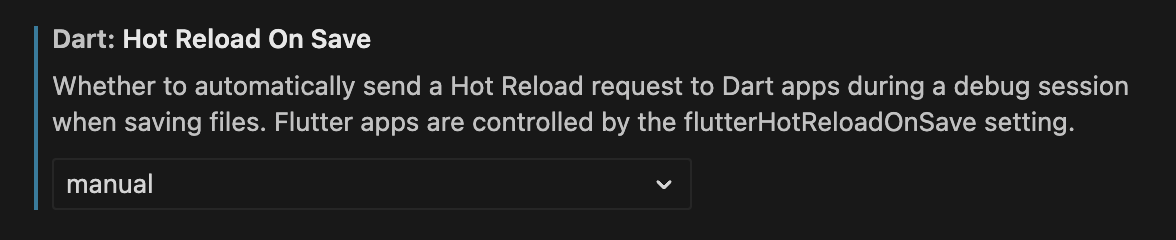
In settings.json, the same setting reads:
"dart.hotReloadOnSave": "manual",
Then start the server in Debug mode from the IDE, which enables the VM service and connects the IDE to it.
From the command line, start the server with the VM service enabled:
dart run --enable-vm-service bin/hello_world.dart
The VM prints the address of its service, and a reload is triggered from an IDE or another tool connected to that address.
What a reload changes
A reload replaces the code of the program, but it does not run main again, and objects created before the reload stay as they were. Where a piece of code lives therefore decides whether a reload changes it. This program has three handlers in three different places:
Response hello(Request req) => .ok(body: .fromString('Hello, version 1\n'));
class ApiRoutes implements RouterInjectable {
void injectIn(RelicRouter router) {
router.get(
'/api/status',
(req) => Response.ok(body: .fromString('Status, version 1\n')),
);
}
}
  final app = RelicApp()
    ..get('/hello', hello)
    ..get(
      '/inline',
      (req) => Response.ok(body: .fromString('Inline, version 1\n')),
    )
    ..inject(ApiRoutes());
Start it with the VM service, and request each route:
/hello        Hello, version 1
/inline       Inline, version 1
/api/status   Status, version 1
/api/version  404 Not Found
/new          404 Not Found
Now edit the program. Change every version 1 to version 2, add a route for /api/version inside injectIn, and add a route for /new to the app in main. Save, let the reload happen, and request the same routes again:
/hello        Hello, version 2
/inline       Inline, version 1
/api/status   Status, version 2
/api/version  Version 2
/new          404 Not Found
Each line has its own explanation. hello is a named function, the router holds the function itself, and the reload replaced its code. The inline handler for /inline is a closure that was created when main ran, and the router still holds that closure. Whether a reload changes the code of a closure that already exists is up to the Dart VM, and in this run, on Dart 3.13, it did not, so the handler still says version 1. Do not count on that one way or the other. RelicApp keeps the ApiRoutes object and calls its injectIn again on every reload, so the new code there ran, with its changed handler and its new route. The route for /new was added in main, which did not run again, so the router never heard of it.
That suggests how to arrange a program you are working on. Put handler code in named functions, and put routes you are still changing inside a RouterInjectable, registered with inject. A HandlerObject is a RouterInjectable too, which registers itself. Restart the server after changing the route list in main, after changing middleware that a factory function built at startup, as the Middleware page describes, and after changing global state.
Examples & further reading
Examples
- Hot reload example - The program behind this page.